

Appearance
Choose how to use Supabase
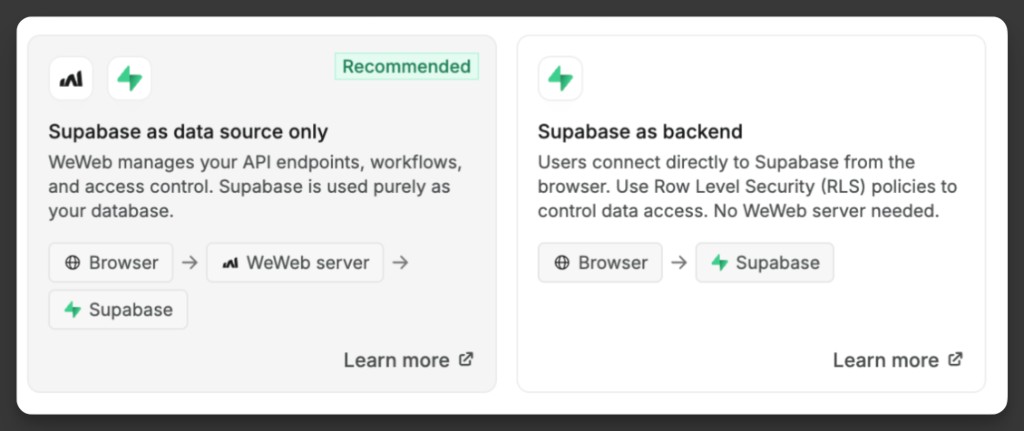
When you create your first Supabase table, WeWeb asks how you want that connection to work. This choice decides who protects your data: WeWeb, or the rules you set up in Supabase.
The two options
When Supabase is already connected and you create your first Supabase table, WeWeb shows a step titled How do you want to use Supabase? before the normal table setup.
You’ll see two cards:
| Option | Flow | Best when |
|---|---|---|
Supabase as data source only (Recommended) | Browser → WeWeb server → Supabase | You want WeWeb to manage API Endpoints, workflows, and access control, and keep Supabase as the database |
Supabase as backend | Browser → Supabase | You want the browser to talk to Supabase directly, and you’ll secure data with Supabase Row Level Security (RLS) |
Your choice becomes the default for future Supabase tables in that project. The mode step does not appear again unless you open it with Change default.
Learn how to change your default later →
Supabase as data source only (recommended)
In this mode, WeWeb sits between the browser and Supabase:
- Table views and API Endpoints run through your WeWeb server.
- You control access with WeWeb
Securitysettings (and Middleware if needed). - Supabase is used as the database. Users do not connect to it directly from the browser for those table views.
During table setup, you can enable Create API endpoints on your WeWeb server to access or update table data so WeWeb creates starter API Endpoints for that table.
For a practical walkthrough of this pattern, see Use WeWeb as an API layer on top of Supabase.
Supabase as backend
Choose Supabase as backend when you want users to connect to Supabase from the browser, without sending those table fetches through the WeWeb server.
In this mode:
- The flow is Browser → Supabase.
- You secure data with Supabase Row Level Security (RLS) policies.
- No WeWeb server is required for those table fetches.
- You typically call Supabase actions from
Interfaceworkflows when you need custom reads or writes.
This is a good fit if you already manage access in Supabase with RLS, and you want the client to talk to Supabase directly.
RLS IS REQUIRED FOR SECURITY
When the browser talks to Supabase directly, your RLS policies are what protect the data. Enable RLS on the table and add policies that match how your app should allow select, insert, update, and delete.
If RLS feels hard to manage for your app, prefer Supabase as data source only and secure access in WeWeb instead.
Learn more about using WeWeb as the API layer →
Use WeWeb as an API layer on top of Supabase
This is the deeper pattern behind Supabase as data source only.
Supabase has a feature called Row Level Security (RLS). It can be powerful, but it can also be hard to set up correctly for real apps.
If you prefer, you can keep Supabase as your database, and use WeWeb as the API layer that controls access.
One pattern some teams use is:
- Turn on RLS for your Supabase tables.
- Don’t add any RLS policies.
- With no policies, Supabase will block all user access to that table.
- In WeWeb, create the views and API Endpoints you need on top of those Supabase tables.
- Secure those views and API Endpoints using WeWeb
Securitysettings (and Middleware workflows if needed).
This works because the Supabase connection in WeWeb includes a Secret Key, so WeWeb can retrieve the data server-side and then apply your WeWeb security rules before returning anything to the app.
When you create the table in the recommended mode, keep Create API endpoints on your WeWeb server to access or update table data enabled if you want WeWeb to generate those starter endpoints for you.
Quick guide: Set up backend logic on top of Supabase →
Backend workflows and Supabase
If your project has Supabase connected (as a data source or as the Authentication System), WeWeb reminds you that backend workflows always run on your WeWeb server.
That means:
- API Endpoints, Middleware, Event Triggers, and Functions are created and executed on WeWeb.
- They are not created on your Supabase project, and they are not Supabase Edge Functions.
- You can still call Supabase actions from those workflows (for example
Database | Select) when you want server-side logic on top of your Supabase data.
You may see:
- A one-time modal the first time you open a backend workflow:
Backend workflows run on your WeWeb server - A persistent warning in the backend workflow sidebar:
This workflow runs on your WeWeb server, not on Supabase.
These reminders help you avoid confusing WeWeb backend workflows with logic hosted inside Supabase.
CONTINUE LEARNING
Now that you know which mode fits your app, create your first Supabase table in WeWeb.