

Appearance
Intro to the Data & API
WeWeb's native database & APIs helps you store data, manage users, and run secure server logic, without setting up a separate service. You'll create tables for your data, build views with filters and parameters, and expose API Endpoints that your app can call.
Understanding the backend
The Data & API tab is what is termed the 'backend'. The backend is different to the interface. In the backend, all logic and data is secure. Whereas, in the interface, any workflows and variables you have are not secure and are viewable/editable by malicious users.
This means you can utilize the backend to store private data and handle secure logic.
Core blocks
- Tables — Define structured data (rows and columns). Learn more →
- Views — Saved filters, sorts, and parameters over a table. Learn more →
- API Endpoints — Secure, versioned workflows for database editing and third‑party APIs. Learn more →
- Scheduled Tasks — Run backend workflows automatically, once at a specific time or on a recurring schedule. Learn more →
- Authentication — Manage users and roles; enforce access on views and API Endpoints. Learn more →
- AI Gateway — Generate text, images, or embeddings from backend workflows. Learn more →
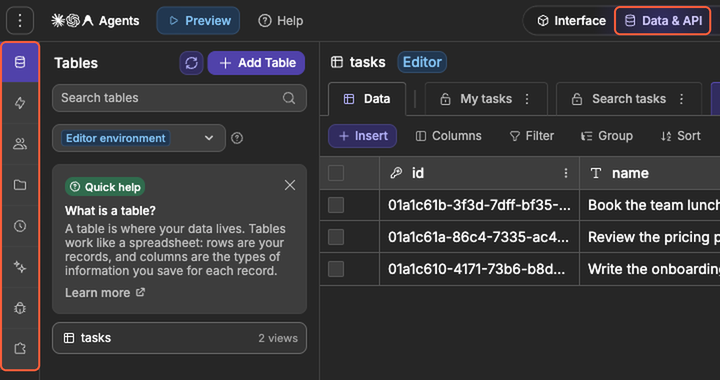
Each block has its own subtab in the bar on the left of the Data & API tab. From top to bottom: Tables (tables and views), Backend Workflows (API Endpoints and the other backend workflows), Authentication, Storage, Scheduled Tasks, AI, Logs, and Integrations.
Creating a table
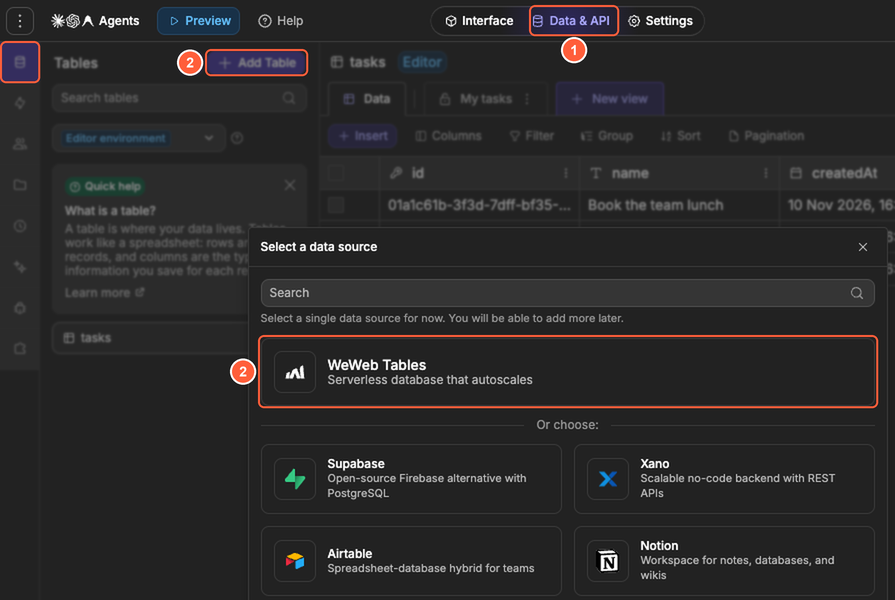
- Go to the
Data & APItab, then open theTablessubtab - Click
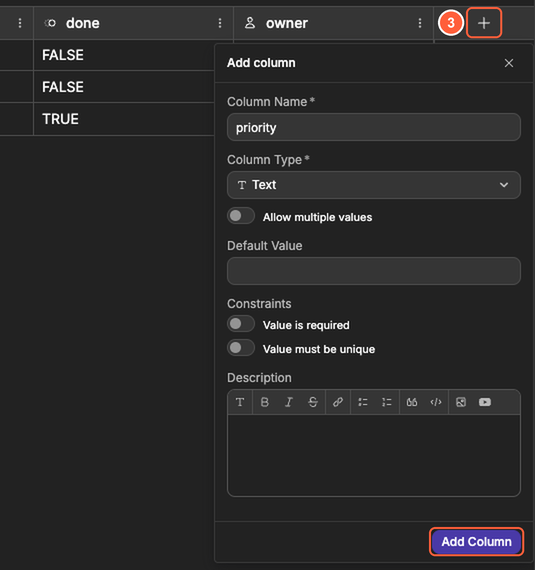
Add Table, chooseWeWeb Tables, enter aNameand an optionalDescription, then clickContinue - Define the columns of the table, such as a text or number column, with the
+at the end of the column headers
COLUMN TYPES AND SETTINGS
Columns have various available types and settings that you can configure. Understanding all these possible types and configurations allows you to build as efficiently and as scalably as possible.
Adding data to the table
You can add records in two ways:
Inline in the editor
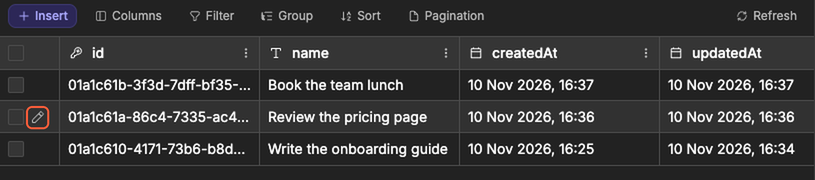
- Double-click a cell to edit its value, or hover a row and click the pencil icon next to its checkbox to edit all its fields in
Update Row - Tick the checkbox of several rows to delete them at once, with the delete button that replaces
Insert
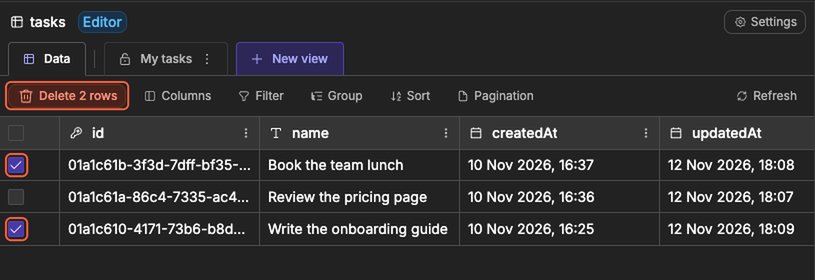
Via an API Endpoint (recommended for production)
- In the
Data & APItab, open theBackend Workflowssubtab, then openAPI Endpointsand create an API Endpoint. - Add parameters in
Parameters (optional)(for example,name,logoUrl, or aTable Linkto auto‑map columns) - Add the
Insert rowsaction from theTablesfolder, and map the parameters to the columns - In
Interface, call the API Endpoint from a workflow: clickAdd an action, go toFrom Data & API→API, then select your endpoint
SECURING DATA ACTIONS
It is critical to have a solid understanding of API Endpoints so you can ensure your data updates are both performative and secured.
Fetching data from a table
You typically fetch data with a view or an API Endpoint:
Views for lists and UI binding
- Go to the
Data & APItab, then open theTablessubtab, then select the table you want to use. - At the top of the table, click
New view. - (Optional) Click
Parametersand add things likesearchif you want your view to be filterable (for example, a search input in your interface). - Set up what the view should return using
Filter,Sort, and the access button (PublicorAuthenticated).
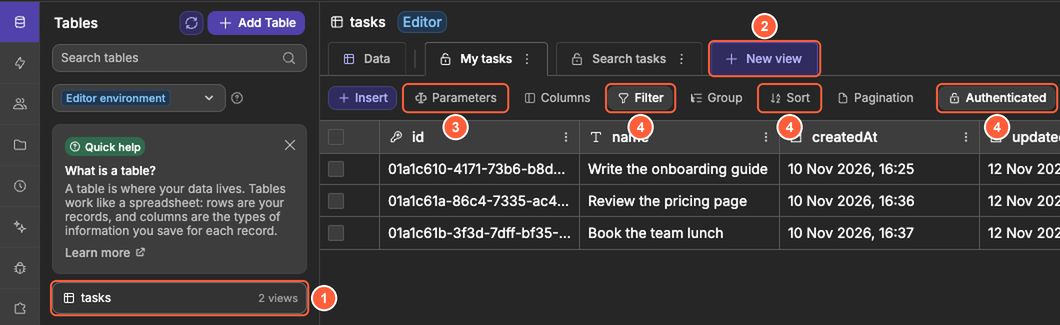
API Endpoint for custom logic
- In the
Data & APItab, open theBackend Workflowssubtab, then openAPI Endpointsand create an API Endpoint. - Add the
Get rowsaction from theTablesfolder and choose your table. Then, inFilters & Sort: - Filter onidto fetch a single record - Or add your own filters to fetch matching records (optionally choose theColumnsto return, a sort, and aLimitinPagination) - Return the resulting data with
Send Response - Call the API Endpoint from the interface and use the resulting data (such as saving it in a variable)
FILTERS, SORTS & PARAMETERS
Using views massively simplifies the process of retrieving exactly the data you need.
Practical examples
BUILD GUIDES
See full, practical examples of using tables, views, and API Endpoints.