

Appearance
Webhooks
Webhooks let your WeWeb backend run workflows when something happens in Stripe—for example when a payment succeeds, a subscription is created, or a checkout session is completed—even when the user is no longer on your site.
What you need
- Webhook enabled on your Stripe connection in WeWeb.
- A webhook endpoint in the Stripe Dashboard pointing to your WeWeb backend URL.
- A backend workflow in WeWeb with a Stripe trigger that matches the events you care about.
Step 1: Enable the webhook in WeWeb
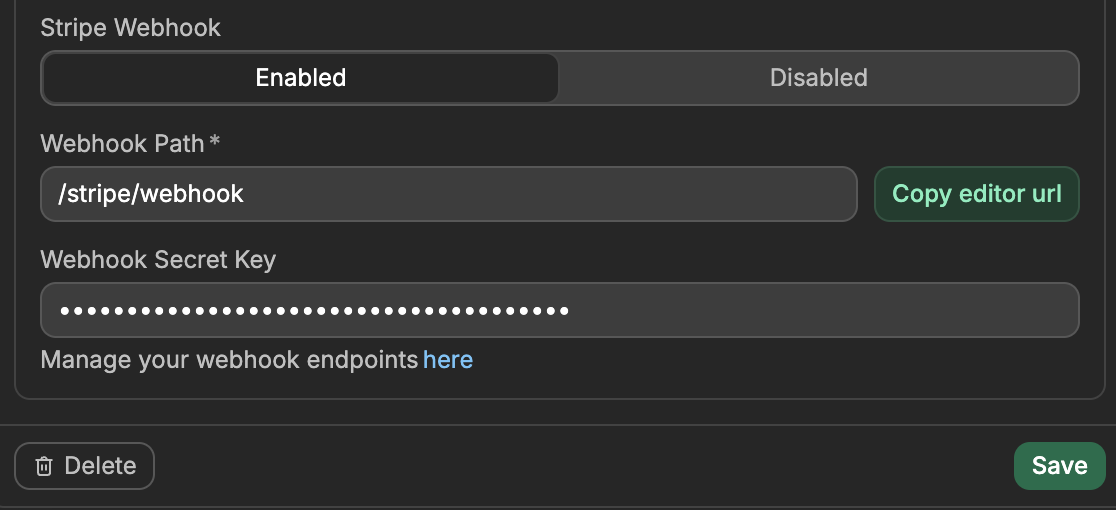
In WeWeb, open the
Data & APItab orInterfacetab, then openIntegrations, selectStripe, and edit your connection (for the environment you use: Editor, Staging, or Production).Set Stripe Webhook to Enabled.
Set Webhook Path (e.g.
/stripe/webhook). The full URL is your backend base URL +api+ this path (e.g.https://your-backend.weweb.io/api/stripe/webhook). The button next to the field copies it, and it is named after the environment you are editing (Copy editor url,Copy production url).Leave Webhook Secret Key empty for now; you’ll paste it after creating the endpoint in Stripe.
Step 2: Add the endpoint in Stripe
- Go to Stripe Dashboard → Webhooks.
- Click Add endpoint.
- Endpoint URL — paste the URL you copied from WeWeb (the one that includes
apiand your path). - Choose which events to send (e.g.
checkout.session.completed,payment_intent.succeeded,invoice.paid,customer.subscription.updated). You can add more later. - After saving, Stripe shows a Signing secret (
whsec_...). Copy it.
Step 3: Paste the signing secret in WeWeb
Back in your Stripe connection in WeWeb, paste the Signing secret into Webhook Secret Key and save. This lets WeWeb verify that incoming requests really come from Stripe.
Step 4: Create a backend workflow with a Stripe trigger
In WeWeb, open the
Data & APItab, then theBackend Workflowssubtab, and go toEvent Triggers.Click
Add, chooseStripe, then pick the trigger that matches the events you selected (e.g.On checkout session event,On payment intent event).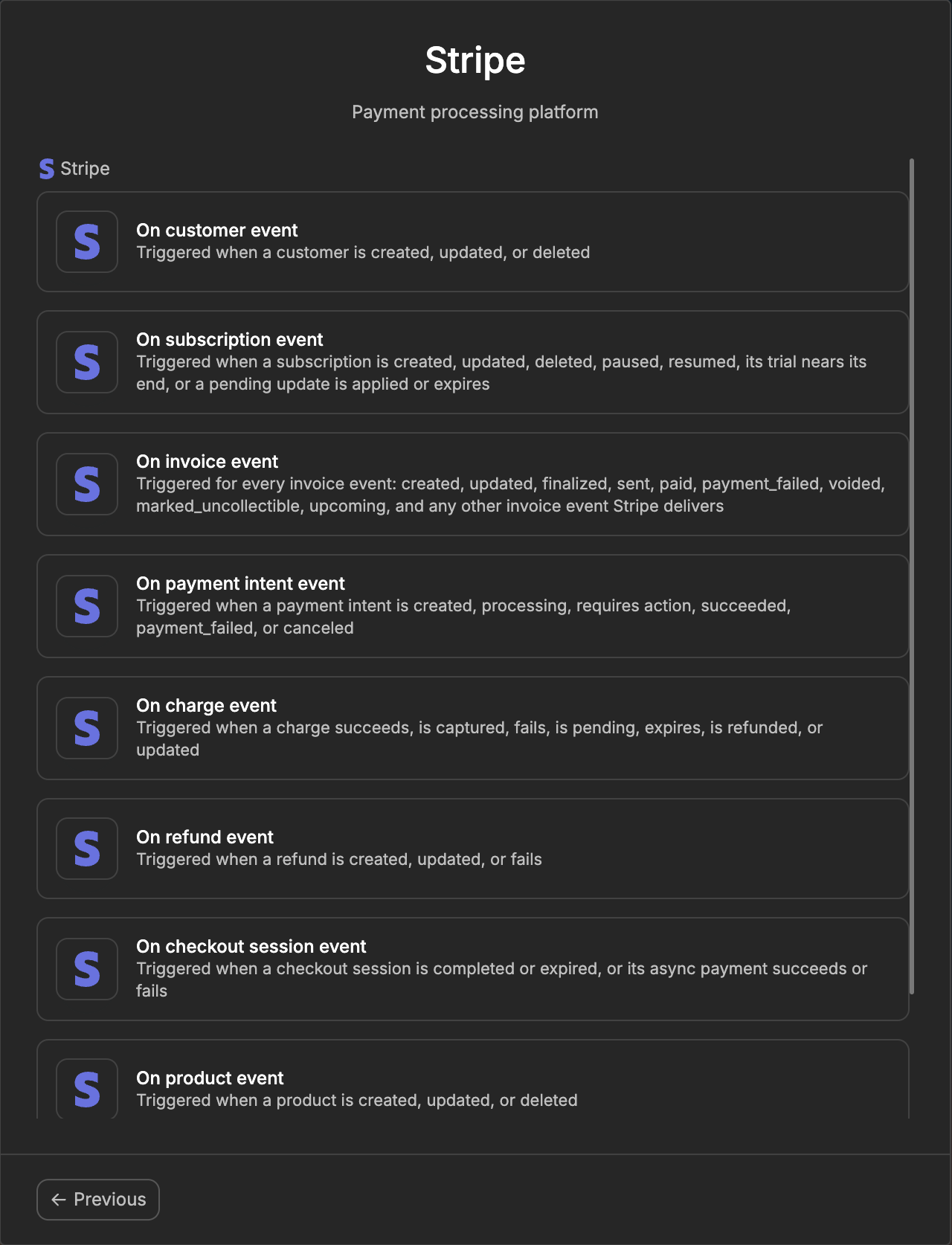
For every trigger except
On refund event, WeWeb creates the workflow with aMulti-option splitalready in place. It sorts events oncontext.event.actionand has one branch per common event (forOn payment intent event:created,succeeded,failed,canceled). Each branch starts with a note: add your own actions under the branch you care about.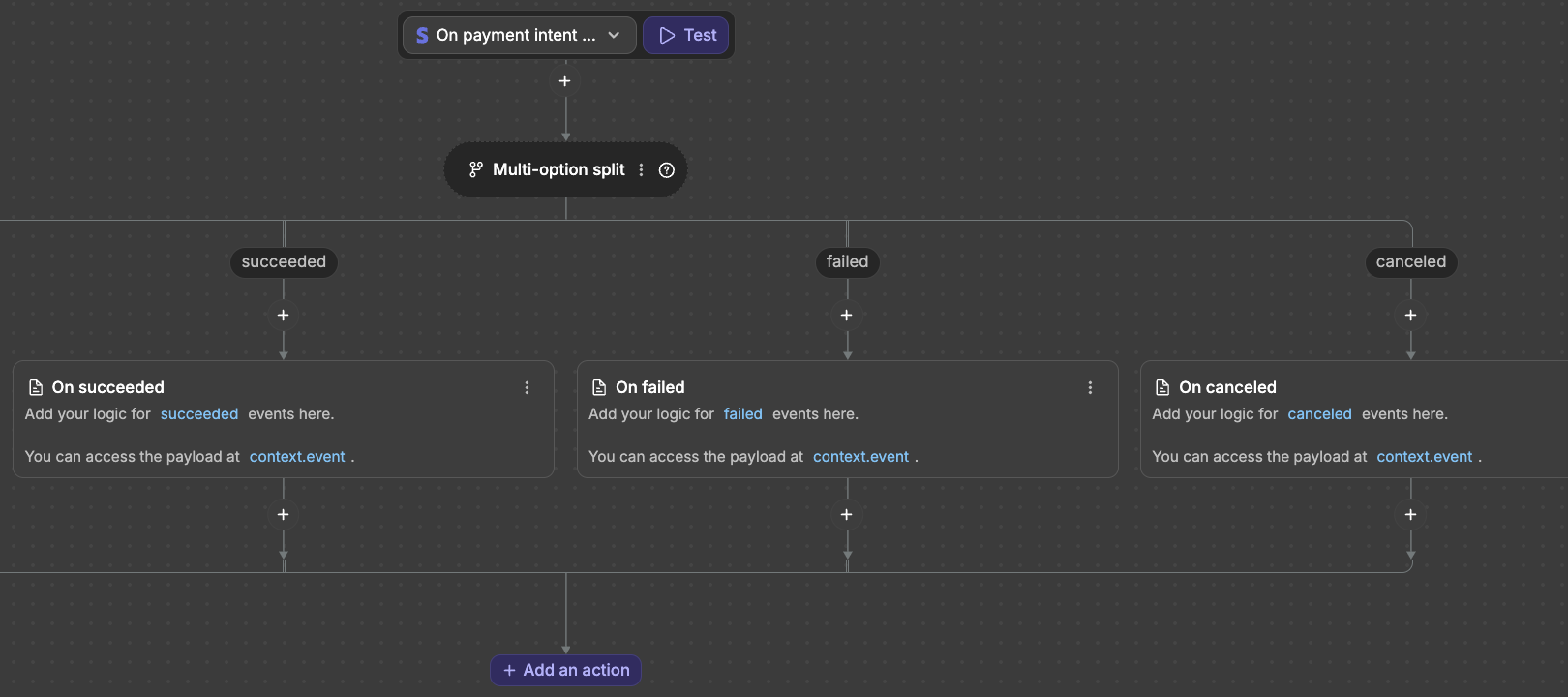
Inside any action, the data Stripe sent is available as
Eventin the binding panel (it iscontext.eventin code).actionholds the event type (e.g.succeeded), and the other fields are the Stripe object itself (id,amount,currency,status,customer…).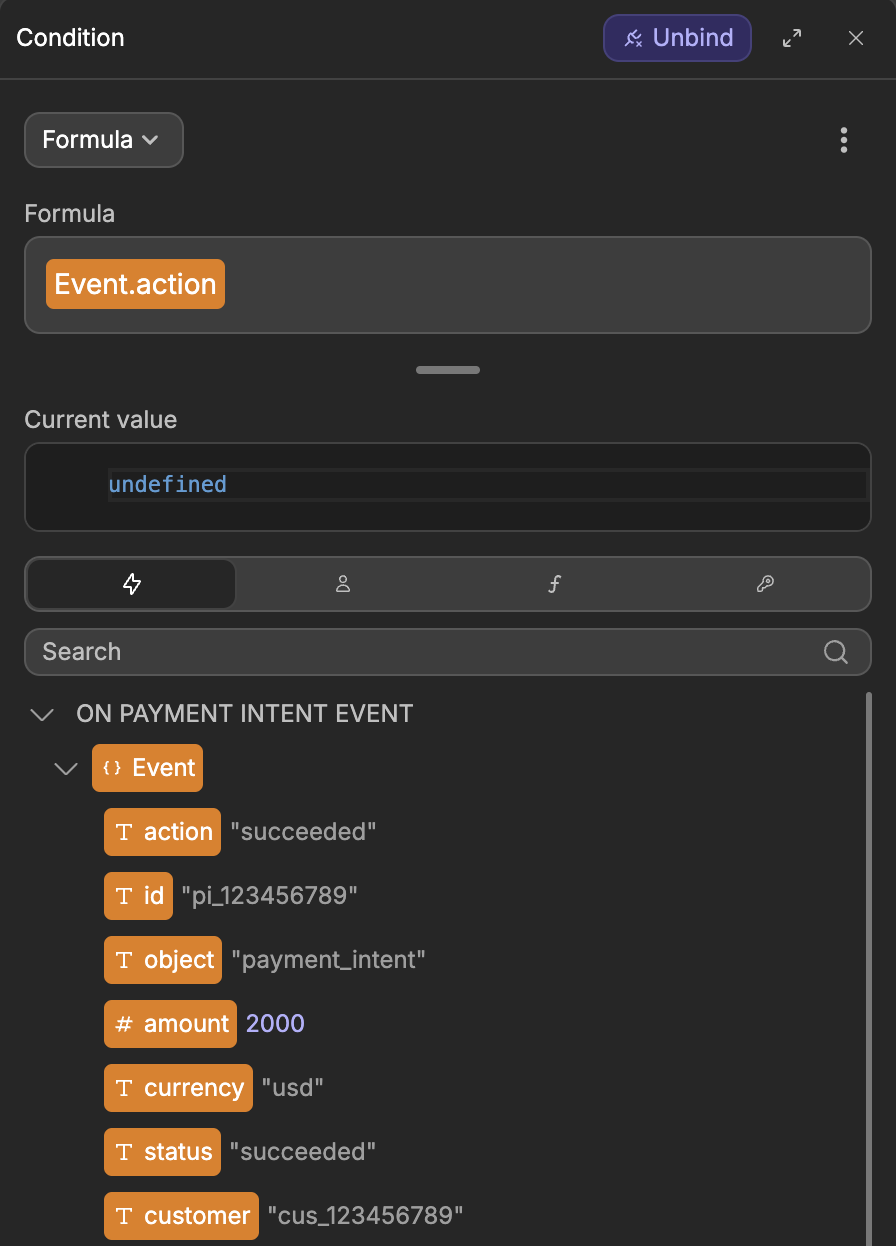
To react to an event that has no branch yet, select the
Multi-option splitand clickAddnext toBranches, then type theactionvalue (e.g.payment_failed). Turn onAdd a default branchif you want a branch for everything else. OnOn refund event, add aMulti-option splityourself withcontext.event.actionas itsCondition.
Each Stripe trigger covers a whole family of events for one resource. WeWeb takes the last segment of the Stripe event type and puts it in context.event.action: invoice.paid arrives on the On invoice event trigger with action set to paid, customer.subscription.updated on On subscription event with action set to updated. Branch on context.event.action inside one workflow rather than expecting a separate trigger per event.
Available webhook triggers
There are nine Stripe triggers. The event.action column lists the values you will branch on. Stripe may deliver other actions for the same resource in future, so treat these as the common set and always have a default branch.
| Trigger | event.action values | Useful for |
|---|---|---|
| On customer event | created, updated, deleted | Sync customer data. |
| On subscription event | created, updated, deleted, paused, resumed, trial_will_end, pending_update_applied, pending_update_expired | Sync plan status, send emails, provision or revoke access. |
| On invoice event | created, finalized, sent, paid, updated, payment_failed, voided, marked_uncollectible, upcoming | Send receipts, dunning, renewals. |
| On payment intent event | created, processing, requires_action, succeeded, payment_failed, canceled | Update order status, grant access, retry logic. |
| On charge event | succeeded, captured, failed, pending, expired, refunded, updated | Analytics, receipts, refund handling. |
| On refund event | created, updated, failed | React to refund progress and failures. |
| On checkout session event | completed, expired, async_payment_succeeded, async_payment_failed | Grant access, save order, send confirmation after Checkout. |
| On product event | created, updated, deleted | Sync catalog. |
| On price event | created, updated, deleted | Sync pricing. |
Things to watch for
The failure action is payment_failed, not failed
On the invoice and payment intent triggers, a failed payment arrives with action set to payment_failed. There is no failed action on those resources, so a branch on failed never runs. (Charges do use failed.)
Watch out when you create an On payment intent event workflow: the Multi-option split WeWeb adds for you has a failed branch. Select the split and change that branch's value to payment_failed, otherwise failed payments go through the workflow without running any of your actions.
Wait for payment_status before fulfilling a checkout
On On checkout session event, a session can reach completed before the money has actually settled when the customer pays with an asynchronous method (e.g. some bank debits). Before you grant access or fulfil an order, check that context.event.payment_status is paid. The final result for async methods arrives later as async_payment_succeeded or async_payment_failed.
The upcoming invoice event has no id
On invoice event with action set to upcoming is a preview of the next subscription invoice, not a real invoice. Its payload.id is null, so any workflow that keys on the invoice id must guard against it.
Subscription period fields moved onto the items
A subscription's current_period_start and current_period_end now live on each item (items.data[]), not at the top level, in what the Stripe API returns. Webhook event payloads still include the legacy top-level fields, so a value read from context.event will not be there when you re-read the same subscription through a Retrieve Subscription action. Read the period from items.data[0] in that case.
Unverified requests are rejected
If the signing secret is missing or wrong, WeWeb rejects the incoming request with a 400 before any workflow runs. If your trigger never fires, re-check that the Webhook Secret Key in WeWeb matches the signing secret in Stripe.
Events outside the nine triggers are accepted and ignored
WeWeb only routes the nine event families in the table above. If you subscribe to anything else in Stripe (a payout, a dispute, a Connect account event), the request is still answered with a 200, so the Stripe dashboard shows the delivery as successful, but no workflow runs. Subscribe only to the events you have a trigger for, otherwise a green checkmark in Stripe can look like a working integration when nothing happened.
Next: Workflow examples