

Appearance
Anakin integration
Anakin.io is a web scraping service: you give it the address of a web page, and it sends back the content of that page. This integration lets your WeWeb backend scrape one page or up to 10 pages at once, and get each page as markdown (plain text with simple formatting), HTML, a list of its links and images, a short summary written by AI, or specific fields extracted by AI.
It is a good fit when your app needs information that lives on other websites: the price of a product, the text of an article, the contact details on a company's site, or a page that only shows its content after some clicks.
Use cases
- Get the text of an article or a help page to show it in your app or pass it to an AI.
- Pull specific fields from a page, like a product's name, price and stock, as structured data you can save in a table.
- Check up to 10 competitor pages at once and store their content.
- Scrape pages that only load their content with scripts, or after clicking a button or scrolling.
- See a page the way visitors from another country see it, for example to compare local prices.
Setup
Anakin connects with a single API key, a secret code that identifies your Anakin account. It starts with ask_.
- Sign in to Anakin (create a free account if you don't have one) and open the
Developersection of your account page. - Create an API key and copy it.
- In WeWeb, open
Data & API→Integrations, selectAnakin, and clickAdd Connection. - Paste the key in the
API Keyfield for each environment you use (Editor,Staging,Production).Stagingonly appears if your plan includes it. - Click
Create. - Test the connection: in a backend workflow, add the
Scrape URLaction, setURLtohttps://example.com, and run the workflow. The result should havestatusset tocompletedand the page's text inmarkdown.
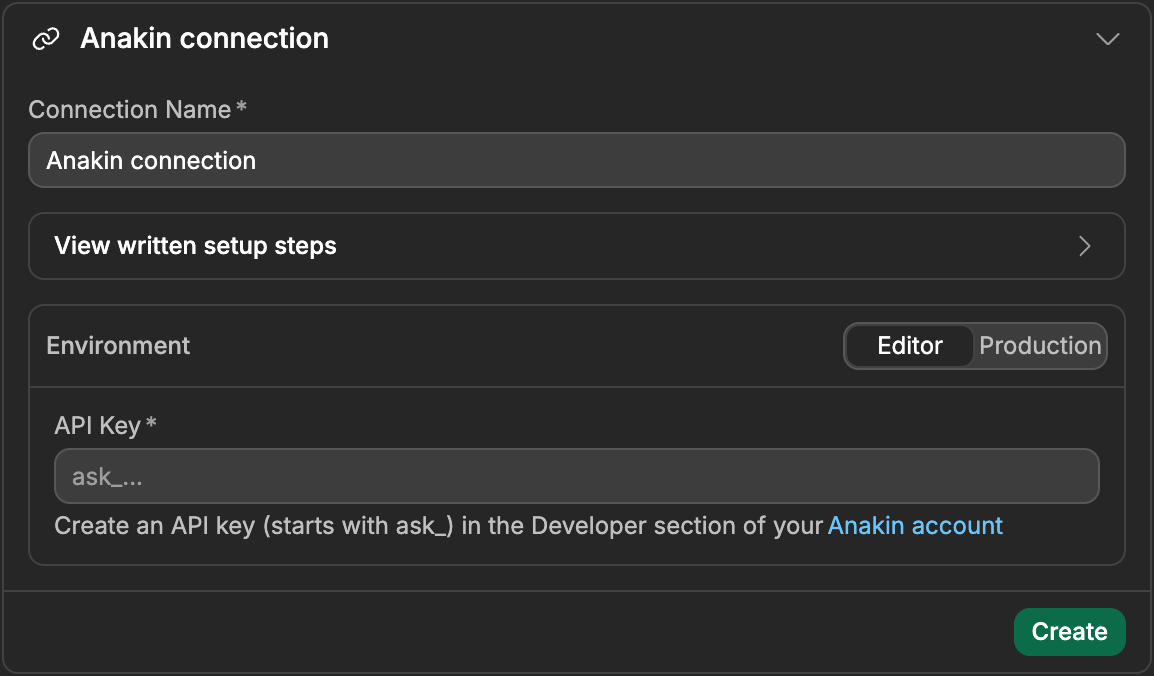
TEST THE KEY RIGHT AWAY
WeWeb doesn't check the key when you create the connection. A wrong or incomplete key only shows up when an action runs, as a 401 error. Run the test in step 6 as soon as the connection is created.
How Anakin works with WeWeb
A few Anakin concepts shape every action on this page.
Backend actions only
All Anakin actions run on your WeWeb server, in backend workflows, so your API key never reaches your users' browsers. To scrape a page from your interface, for example when a user pastes a link and clicks a button, create an API endpoint in Data & API that runs the Anakin action, then call that API from your page.
Scrapes run as jobs
Anakin doesn't scrape a page on the spot. It creates a job, scrapes the page in the background, and the job goes through these statuses: pending (waiting to start), processing (running), then completed or failed. Most jobs finish in a few seconds.
Scrape URL and Scrape URLs (batch) handle this for you: they start the job, then check it every few seconds until it is done, and return the finished result. If the job takes longer than Max wait (seconds), the action stops waiting and returns the job as it is at that moment, still pending or processing, with its id. Pass that id to Get scrape job to fetch the result later. See Handling slow scrapes.
Always check the status
A scrape that fails is not an error for the workflow: the action succeeds and returns the job with status set to failed, a short error text, and no content. Add a True/False split after the action and only use the content when status is completed.
A completed job can still hold an error page. Anakin returns whatever the website answered, so a page that doesn't exist or that blocked the visit comes back completed with that error page's content. statusCode gives the page's own answer code: below 400 means the page loaded normally, 404 means the page wasn't found, 403 means the site refused the visit. finalUrl gives the address the page ended up on, after any redirects.
A FAILED SCRAPE IS NOT AN ERROR
Your workflow keeps going after a failed scrape. Check status (and statusCode for a single page) before you save or show the content.
What a scrape returns
Every completed scrape returns the page in three versions:
- The
markdownfield holds the page's text, with headings, lists and links kept in a simple text format. It is usually the easiest one to show or send to an AI. - The
htmlfield holds the page's full code. - The
cleanedHtmlfield holds a cleaned version of the page's code, lighter thanhtml.
Extra formats adds more content to the result:
- Choosing
Linksaddslinks, the list of links on the page, each with itshref(the address) andtext. - Choosing
Imagesaddsimages, the list of images on the page, each with itssrc(the address) andalt(its description). - Choosing
AI summary (+1 credit)addssummary, a short summary of the page written by AI. The text itself is insummary.summary.
Extra formats only exists on Scrape URL and Start scrape job. A field you didn't ask for is missing from the result, not empty.
Credits
Anakin bills each scrape in credits:
| What you use | Cost |
|---|---|
| Each page scraped | 1 credit |
AI summary (+1 credit) in Extra formats | +1 credit |
Generate JSON, or an Output schema | +2 credits |
Use browser, or any Browser steps | +1 credit |
A scrape that fails costs nothing, and Get scrape job is free. In a batch, the options apply to every page, so 10 pages with Generate JSON cost 30 credits. See Anakin's pricing page for its plans and the credits each one includes.
Extracting data with AI
Instead of reading through a whole page, you can ask Anakin's AI to pull out the fields you need and return them as JSON (structured data with named fields, which you can save in a table or use in a formula).
There are two ways to do it:
- Turn on
Generate JSON. The AI picks the fields itself, based on what it finds on the page. - Fill
Output schemato choose the fields yourself. You don't need to turn onGenerate JSONas well: a schema turns it on for you.
The Output schema is a JSON Schema, a description of the fields you want and their type. It must start with "type": "object" and list your fields under properties. For example, to get a product's name, price and stock:
json
{
  "type": "object",
  "properties": {
    "name": { "type": "string" },
    "price": { "type": "number" },
    "inStock": { "type": "boolean" }
  },
  "required": ["name"]
}
The extracted fields come back in generatedJson.data:
json
{
  "generatedJson": {
    "data": { "name": "Pro plan", "price": 49, "inStock": true }
  }
}
Leave Output schema as {} for no extraction. A schema that doesn't start with "type": "object" and a properties list is refused before anything is sent to Anakin, with the message The schema must describe an object.
Generate JSON is available on every scraping action. Output schema is only on Scrape URL and Start scrape job.
Scraping pages that need a browser
Some websites build their content with scripts once the page is open, so a plain scrape gets an empty or half-loaded page. Turn on Use browser and Anakin opens the page in a real web browser (without a screen), waits for the scripts to run, then scrapes the result. It costs 1 more credit per page.
Browser steps
On Scrape URL and Start scrape job, Browser steps lets you act on the page before it is scraped: wait for something to appear, click a button, scroll, type text or press a key. Adding any step turns on Use browser for you.
Each step has a Step type, and the Selector and Value fields mean something different for each type. A selector is a CSS selector: a short code that points to an element on the page, like #load-more (the element with the ID load-more) or .price (the elements with the class price). Your browser's inspect tool shows the ID and classes of any element.
| Step type | Selector | Value |
|---|---|---|
Wait (ms) | Not used | Required. How long to wait, in milliseconds, from 1 to 15000 |
Wait for element | Required. The element to wait for | Optional. The longest wait, in milliseconds. Default 10000 |
Click | Required. The element to click | Not used |
Scroll | Optional. The element to scroll. Empty scrolls the page | Optional. up or down. Default down |
Write text | Not used | Required. The text to type, up to 1000 characters |
Press key | Not used | Required. The key to press, like Enter or Tab |
For example, to load more results before scraping a list: a Wait for element step with the selector #results, then a Click step with the selector #load-more, then a Wait (ms) step with the value 2000.
Anakin allows at most 15 steps per scrape, each wait up to 15000 ms (15 seconds), all waits together up to 30000 ms (30 seconds), and selectors up to 500 characters. WeWeb checks these limits before sending the scrape, so a step that breaks them stops the workflow with a clear message and costs nothing.
Choosing the country of the visit
Some websites show different content, prices or languages depending on where the visitor is. With Country, Anakin visits the page from that country. The list has 207 countries and territories. When Country is empty, Anakin uses the United States.
Handling slow scrapes
Backend workflows have a time limit, so the actions that wait for a scrape stop waiting after Max wait (seconds): 60 seconds by default for Scrape URL, 90 for Scrape URLs (batch), and never more than 100. When that happens, the action returns the job with status still pending or processing, and its id.
You have two ways to handle long scrapes, for example pages with many browser steps:
- Keep
Scrape URL, and add aTrue/False splitafter it. Whenstatusispendingorprocessing, save theidand callGet scrape jobwith it later. - Use the pair made for this.
Start scrape jobstarts the scrape and returns right away with ajobId. Save it, for example in a table, and callGet scrape jobwith it later, from another workflow or a scheduled task, untilstatusiscompletedorfailed.
Get scrape job is free and isn't rate limited, so you can call it as often as you need. Fetch the result soon after the scrape, though: Anakin doesn't say how long it keeps finished jobs.
Learn more about scheduled tasks →
Common pitfalls (setup & usage)
Every action fails with a 401 error
The API key is wrong, incomplete, or was deleted in Anakin. WeWeb doesn't check the key when you create the connection, so the problem only shows up on the first action. Copy the key again from the Developer section of your Anakin account (it starts with ask_) and paste it in each environment of the connection.
The scrape "worked" but the content is empty
The action returned status set to failed: Anakin couldn't scrape the page, and a failed scrape has no content. It isn't an error, so the workflow keeps going. Check status before using the result, and try again with Use browser turned on, or with another Country.
The content is a "page not found" page
The job is completed, but the website answered with an error page. Check that statusCode is below 400 before using the content. If the address is right and you get 403, the site is blocking the visit: try Use browser or another Country.
Some pages of a batch are missing
In Scrape URLs (batch), the batch is completed even when some pages failed. Each item of results has its own status: check it for every page. Batch results also don't include statusCode, so use Scrape URL when you need to know whether a page loaded normally.
The result says "pending" or "processing"
The scrape took longer than Max wait (seconds). The job keeps running at Anakin: pass the returned id to Get scrape job to fetch the result. See Handling slow scrapes.
The page is empty or incomplete
The site loads its content with scripts. Turn on Use browser, and if the content only appears after a click or a scroll, add Browser steps, starting with a Wait for element step.
The extracted JSON has the wrong fields
With only Generate JSON turned on, the AI chooses the fields. To get the same fields every time, describe them in Output schema.
All Actions
Four actions: two that scrape and wait for the result, and an advanced pair to start a scrape and fetch its result later. Each action name links to its details below.
| Action | Description |
|---|---|
| Scrape URL | Scrape one page and wait for its content. |
| Scrape URLs (batch) | Scrape 1 to 10 pages at once and wait for their content. |
| Start scrape job | Start scraping one page without waiting for the result. |
| Get scrape job | Get the status and content of a scrape. |
Action details
Scrape URL
Scrape one page and wait for the result, for up to Max wait (seconds).
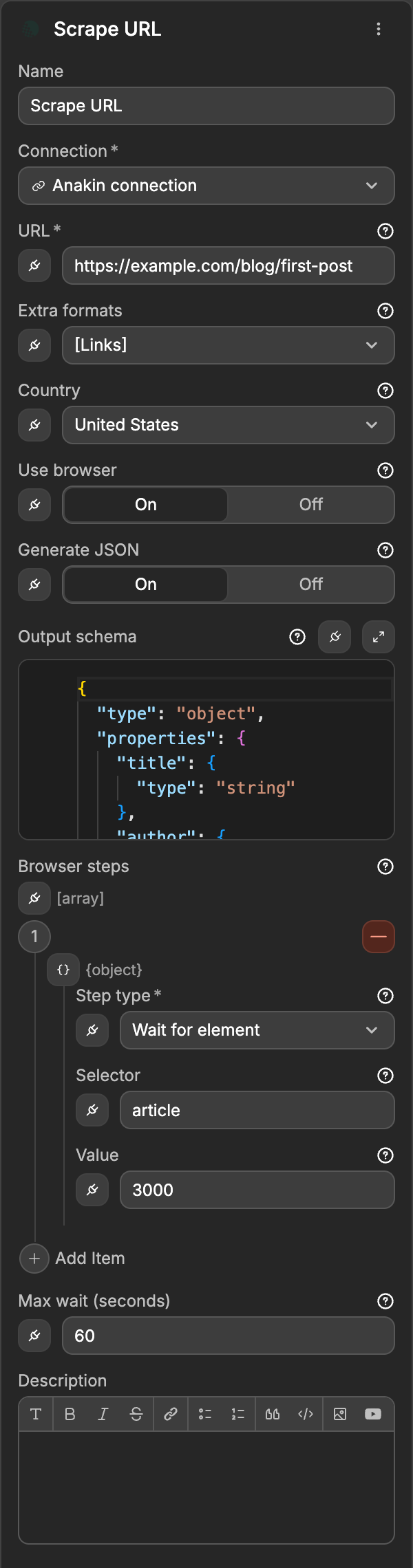
Inputs
| Display Key | Example Input | Description | Restrictions |
|---|---|---|---|
URL | https://example.com/pricing | Address of the page to scrape. | Required. Full http or https address. An address whose domain doesn't exist is refused right away |
Extra formatsOptional | ["links","summary"] | Extra content to return, on top of markdown, html and cleanedHtml. | Valid: Links, Images, AI summary (+1 credit). When bound: links, images, summary |
CountryOptional | fr | Country to visit the page from. | Pick from the list. When bound, a two-letter code like fr. Default us |
Use browserOptional | false | Open the page in a real browser so its scripts run. | +1 credit. Default false |
Generate JSONOptional | false | Extract structured data from the page with AI. | +2 credits. Default false |
Output schemaOptional | {"type":"object","properties":{"title":{"type":"string"}}} | The fields to extract with AI. Turns on Generate JSON. | JSON Schema starting with "type": "object" and properties. Default {} (no extraction) |
Browser stepsOptional | [{"type":"wait_for","selector":"#results","value":"5000"}] | Actions to run on the page before it is scraped. Turns on Use browser. | Up to 15 steps. See Browser steps |
Max wait (seconds)Optional | 90 | How long to wait for the result before returning the job as it is. | From 5 to 100. Default 60 |
When bound, each item of Browser steps is an object with type (wait, wait_for, click, scroll, write or press), selector and value.
Example output
json
{
  "id": "4f8b2c1a-9d3e-4f6a-b7c8-0d1e2f3a4b5c",
  "status": "completed",
  "url": "https://example.com/pricing",
  "jobType": "url_scraper",
  "country": "us",
  "markdown": "# Pricing\n\nPro plan: $49/month …",
  "html": "<!DOCTYPE html><html>…</html>",
  "cleanedHtml": "<main><h1>Pricing</h1>…</main>",
  "links": [{ "href": "https://example.com/signup", "text": "Sign up" }],
  "cached": false,
  "statusCode": 200,
  "finalUrl": "https://example.com/pricing",
  "createdAt": "2026-10-28T10:00:00.000Z",
  "completedAt": "2026-10-28T10:00:04.000Z",
  "durationMs": 4120
}
A failed scrape returns the job without content:
json
{
  "id": "4f8b2c1a-9d3e-4f6a-b7c8-0d1e2f3a4b5c",
  "status": "failed",
  "url": "https://example.com/pricing",
  "jobType": "url_scraper",
  "country": "us",
  "error": "Failed to scrape webpage",
  "createdAt": "2026-10-28T10:00:00.000Z",
  "completedAt": "2026-10-28T10:00:09.000Z"
}
Documentation of API endpoint that powers action: Anakin API – Submit scrape job (POST /v1/url-scraper)
Scrape URLs (batch)
Scrape 1 to 10 pages at the same time and wait for all of them, for up to Max wait (seconds). The options apply to every page.
Inputs
| Display Key | Example Input | Description | Restrictions |
|---|---|---|---|
URLs | ["https://example.com","https://example.org"] | Addresses of the pages to scrape. | Required. From 1 to 10 full http or https addresses. Empty items are ignored |
CountryOptional | fr | Country to visit the pages from. | Pick from the list. When bound, a two-letter code like fr. Default us |
Use browserOptional | false | Open every page in a real browser so its scripts run. | +1 credit per page. Default false |
Generate JSONOptional | false | Extract structured data from every page with AI. | +2 credits per page. Default false |
Max wait (seconds)Optional | 90 | How long to wait for the whole batch before returning it as it is. | From 5 to 100. Default 90 |
The batch has no Extra formats, Output schema or Browser steps. Use Scrape URL when you need them.
Example output
json
{
  "id": "9a1c3e5f-7b2d-4c6e-8f0a-1b3d5e7f9a2c",
  "status": "completed",
  "jobType": "batch_url_scraper",
  "country": "us",
  "urls": ["https://example.com", "https://example.org"],
  "results": [
    {
      "index": 0,
      "url": "https://example.com",
      "status": "completed",
      "markdown": "# Example Domain\n\nThis domain is for use in examples …",
      "html": "<!DOCTYPE html><html>…</html>",
      "cleanedHtml": "<div><h1>Example Domain</h1>…</div>",
      "cached": false,
      "durationMs": 3210
    },
    {
      "index": 1,
      "url": "https://example.org",
      "status": "failed",
      "error": "Failed to scrape webpage"
    }
  ],
  "createdAt": "2026-10-28T10:00:00.000Z",
  "completedAt": "2026-10-28T10:00:06.000Z",
  "durationMs": 6050
}
results keeps the order of URLs: index is the position of the page in your list, starting at 0.
Documentation of API endpoint that powers action: Anakin API – Scrape URLs batch (POST /v1/url-scraper/batch)
Start scrape job
Start scraping one page and return right away, without the content. Use the returned jobId with Get scrape job to fetch the result. It takes the same inputs and costs the same credits as Scrape URL, without Max wait (seconds) and with Webhook URL.
Inputs
| Display Key | Example Input | Description | Restrictions |
|---|---|---|---|
URL | https://example.com/pricing | Address of the page to scrape. | Required. Full http or https address |
Extra formatsOptional | ["links","summary"] | Extra content to return, on top of markdown, html and cleanedHtml. | Valid: Links, Images, AI summary (+1 credit). When bound: links, images, summary |
CountryOptional | fr | Country to visit the page from. | Pick from the list. When bound, a two-letter code like fr. Default us |
Use browserOptional | false | Open the page in a real browser so its scripts run. | +1 credit. Default false |
Generate JSONOptional | false | Extract structured data from the page with AI. | +2 credits. Default false |
Output schemaOptional | {"type":"object","properties":{"title":{"type":"string"}}} | The fields to extract with AI. Turns on Generate JSON. | JSON Schema starting with "type": "object" and properties. Default {} (no extraction) |
Browser stepsOptional | [{"type":"click","selector":"#load-more"}] | Actions to run on the page before it is scraped. Turns on Use browser. | Up to 15 steps. See Browser steps |
Webhook URLOptional | https://your-app.com/hooks/anakin | Address that Anakin notifies when the scrape is done or has failed. | Full http or https address |
Webhook URL is passed to Anakin as is: WeWeb has no Anakin trigger to receive the notice for you. If you don't have an address set up to receive it, leave it empty and use Get scrape job. Learn more about Anakin webhooks →
Example output
json
{
  "jobId": "4f8b2c1a-9d3e-4f6a-b7c8-0d1e2f3a4b5c",
  "status": "pending"
}
Documentation of API endpoint that powers action: Anakin API – Submit scrape job (POST /v1/url-scraper)
Get scrape job
Get the current status and content of a scrape, single page or batch. It is free and isn't rate limited.
Inputs
| Display Key | Example Input | Description | Restrictions |
|---|---|---|---|
Job ID | 4f8b2c1a-9d3e-4f6a-b7c8-0d1e2f3a4b5c | ID of the scrape: the jobId returned by Start scrape job, or the id returned by Scrape URL or Scrape URLs (batch) when they stopped waiting. | Required. Text |
The result has the same shape as the result of Scrape URL (for one page) or Scrape URLs (batch) (for a batch). While the scrape is still running, status is pending or processing and there is no content yet.
Example output
json
{
  "id": "4f8b2c1a-9d3e-4f6a-b7c8-0d1e2f3a4b5c",
  "status": "completed",
  "url": "https://example.com/pricing",
  "jobType": "url_scraper",
  "country": "us",
  "markdown": "# Pricing\n\nPro plan: $49/month …",
  "html": "<!DOCTYPE html><html>…</html>",
  "cleanedHtml": "<main><h1>Pricing</h1>…</main>",
  "generatedJson": {
    "data": { "title": "Pricing" }
  },
  "cached": false,
  "statusCode": 200,
  "finalUrl": "https://example.com/pricing",
  "createdAt": "2026-10-28T10:00:00.000Z",
  "completedAt": "2026-10-28T10:00:12.000Z",
  "durationMs": 11840
}
Documentation of API endpoint that powers action: Anakin API – Get job status (GET /v1/url-scraper/{id})
Error handling
Two kinds of problems stop your workflow:
- WeWeb's own checks, before anything is sent to Anakin: more than 10 URLs in a batch, a browser step over Anakin's limits, an
Output schemathat isn't a valid schema, or a value of the wrong type (for example a country name instead of a two-letter code). Nothing is billed. - Errors from Anakin. The message starts with Anakin's error code, followed by its explanation, for example
insufficient_credits: ….
A scrape that fails is not one of them: it returns status set to failed. See Always check the status.
To handle errors yourself, put the action inside a Try/Catch. In the Catch branch, caughtError.message holds the message, and caughtError.cause.code holds the error code from the table below (400 for WeWeb's own checks). In an API endpoint, use it in a Return Response action so your page gets the real reason instead of a generic 500 error.
| Error code and type | Reason |
|---|---|
| 400 Bad Request | A value was refused (invalid_request), for example an address whose domain doesn't exist, or a value outside the allowed range. Also used for WeWeb's own checks. |
| 401 Unauthorized | The API key is missing, wrong or was deleted in Anakin (unauthorized). |
| 403 Forbidden | The job belongs to another Anakin account (forbidden), for example when Get scrape job uses a job started with another connection's key. |
| 402 Payment Required | Your Anakin account doesn't have enough credits for this scrape (insufficient_credits). The message gives the cost and your balance. For a batch, Anakin checks the cost of every page before starting. |
| 404 Not Found | Get scrape job was given an ID that doesn't exist (not_found). |
| 429 Too Many Requests | Too many scrapes started in a short time (rate_limit_exceeded). Anakin allows 60 per minute. Wait and retry. Get scrape job isn't limited. |
| 500, 502, 503 | An error on Anakin's side. Retry later. |
If a gateway or firewall page answers instead of Anakin, the message says non-JSON (HTML) response: no job was read, so retry later.
FAQs
Where do I find my API key?
In the Developer section of your Anakin account page. Create a key there: it starts with ask_.
Can I scrape a page from my interface?
Not directly: Anakin actions only run in backend workflows. Create an API endpoint in Data & API that runs Scrape URL, and call it from your page's workflow. Protect it so only signed-in users can call it, or anyone could spend your Anakin credits.
Which format should I use?
For text you want to show or send to an AI, use markdown. For specific values, like a price or a date, use Output schema and read them from generatedJson.data. html and cleanedHtml are useful when you need the page's structure.
Why does my scrape say "completed" but show an error page?
Anakin returns whatever the website answered, including "page not found" pages. Check that statusCode is below 400 before using the content.
How do I scrape more than 10 pages?
Split your list into groups of 10 and run Scrape URLs (batch) once per group, for example in a loop. Anakin allows 60 scrapes started per minute.
Can Anakin take screenshots or crawl a whole website?
Not with this integration. It scrapes the pages you give it, one at a time or in batches of up to 10.
CONTINUE LEARNING
Anakin actions run in backend workflows. Learn how to build an API endpoint that your pages can call to scrape a page.