

Appearance
Available tools
Once your client is connected, your agent can call the WeWeb tools below. You don't need to memorize them. Describe your goal in plain language and the agent picks the right tools.
Not connected yet? See Installing WeWeb MCP →.
What are MCP tools?
An MCP server exposes tools: discrete actions the agent can run, such as creating a page, fetching table view data, or editing a workflow. You do not need to call these tools yourself. Describe what you want in plain language and the agent picks the right ones.
Once connected, your client lists the WeWeb tools available in the session. Many clients let you control how those tools are used, for example whether the agent can run a tool automatically or must ask for your approval first.
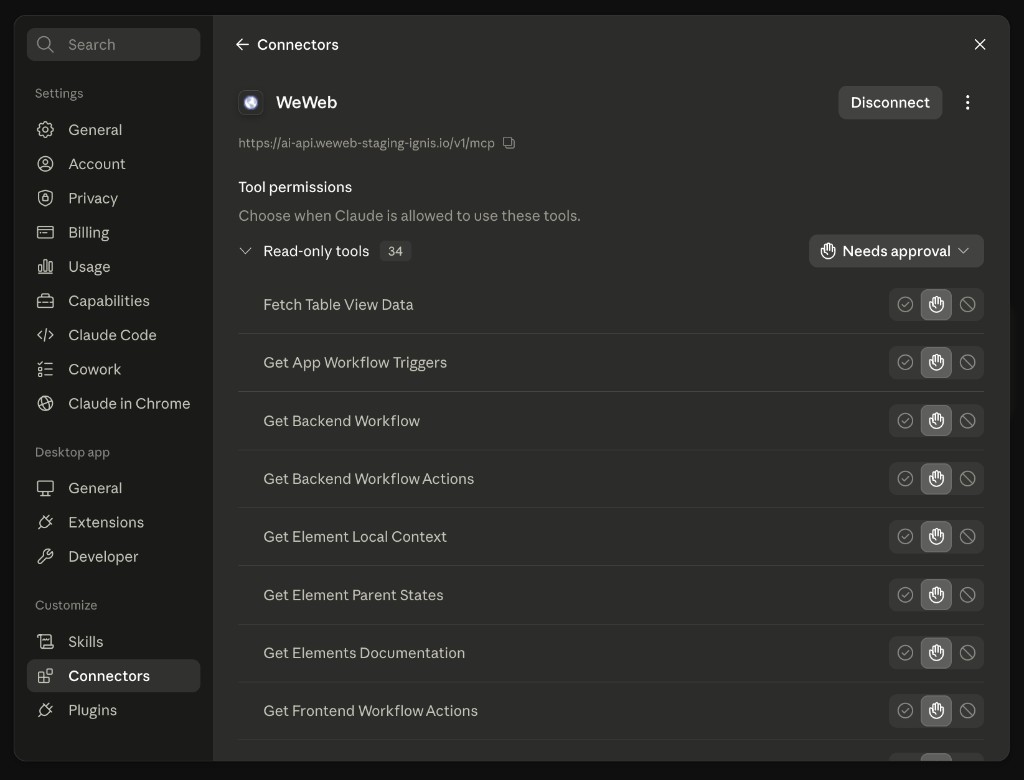
Tool permissions in Claude Desktop
This screenshot is from Claude Desktop, but other clients often offer similar controls in their own settings.
In Claude Desktop, open Settings → Connectors, then open your WeWeb connector. Under Tool permissions, choose for each tool or group of tools whether Claude can run it automatically, needs your approval, or is blocked.
Tools by area
INFO
Backend tools (tables, table views, auth, environment variables, backend workflows, integration connections, storage) only do something once the WeWeb Backend module is installed on the project. The agent checks with getWeWebBackendStatus and can give you an install link with installWeWebBackendUrl.
Session & project
| Tool | Description |
|---|---|
ping | Verify the WeWeb MCP connection |
getMe | Return your user info with all your workspaces and projects — the first call of every session |
getWeWebDocumentation | Look up WeWeb documentation (frontend, backend, workflows, integrations, coded components…) to ground its work |
wewebFeedback | Send feedback about the MCP tools and documentation to the WeWeb team |
Project, deployments & backups
| Tool | Description |
|---|---|
projectEditorSwitchMode | Switch the editor you have open on the project between preview and edit mode |
projectDeployment | Read the publication history of the project, and the logs of a publication that failed |
projectEditorBackup | List your editor backups, save the current state as a new one, or roll the project back to one |
projectDuplicate | Copy a project, with its pages, design system and workflows, into the same workspace |
The agent never publishes for you. When you ask it to publish, it gives you a link to your project editor and tells you to press the Publish button at the top right. This is on purpose: a publication is visible to your app's users straight away, and it can include a database migration that only you can approve.
Rolling back replaces everything currently in your editor with the backup you picked, so anything done since that backup is lost. The agent saves the current state as a backup right before, so a rollback can itself be undone, and every editor you have open on the project reloads once it is finished.
INFO
Saving a new backup requires a plan that includes manual editor backups. On other plans the agent skips it and carries on with your request.
Pages
| Tool | Description |
|---|---|
searchPages | Find pages in the project |
createPage | Create a new page (names and paths must be unique) |
updatePage | Update a page's settings, including its SEO metadata |
Elements & page structure
| Tool | Description |
|---|---|
getElementsDocumentation | Grep-like lookup of the documentation for the elements you want to edit |
getPageSemantic | Read the complete structure of a page — every element, nothing hidden |
getPageElementsByUid | Read specific elements of a page by their UIDs |
getPageElementsVariables | List the global variables exposed by a page's elements |
getElementLocalContext | List the local context variables available to an element (repeat context, parent context…) |
getElementParentStates | List the parent states applied to an element |
editElement | Edit one or more properties on an existing element |
editRepeat | Configure a repeat (list) on an element |
addSection | Add a new section to a page |
reuseSection | Reuse an existing section on a page |
addElements | Add elements to a page |
replaceElement | Replace an existing element on the page with new elements |
deleteSection | Delete a section and all its elements |
deleteElement | Delete an element and its children |
Library components (popups & no-code components)
Library components are reusable pieces of your app: popups (opened with the open-popup workflow action) and no-code components (placed in a layout like any element). Each one can have its own props, variables, formulas and workflows.
| Tool | Description |
|---|---|
listAllComponents | List the popups and no-code components of the project, with their props |
getComponentSemantic | Read the complete structure of a component, plus its props, variables, workflows, formulas |
createComponent | Create a component — type picks the kind: modal (popup) or nocode |
updateComponent | Update a component's name or settings (settings apply to popups) |
deleteComponent | Delete a component and all its content |
createComponentProp | Add props to a component — values are passed in where the component is used |
editComponentProp | Edit an existing component prop |
deleteComponentProp | Delete a component prop |
createComponentVariable | Create variables inside a component |
editComponentVariable | Edit a component variable |
deleteComponentVariable | Delete a component variable |
createComponentFormula | Create a formula inside a component |
editComponentFormula | Edit a component formula |
deleteComponentFormula | Delete a component formula |
createComponentWorkflow | Create a workflow inside a component |
editComponentWorkflow | Edit a component workflow |
deleteComponentWorkflow | Delete a component workflow |
Design system
| Tool | Description |
|---|---|
searchDesignSystemTokens | Inventory or look up design tokens (colors, typographies, spacings) |
createDesignSystemTokens | Create new design tokens |
editDesignSystemToken | Edit an existing design token |
deleteDesignSystemToken | Delete a design token |
searchDesignSystemClasses | Inventory or look up reusable design system classes |
createDesignSystemClass | Create a reusable class for a repeated UI pattern (buttons, cards, inputs) |
editDesignSystemClass | Edit an existing design system class |
deleteDesignSystemClass | Delete a design system class |
createDesignSystemSubClass | Create a sub-class (variant) of an existing class, e.g. a "large" or "danger" variant of a button class |
editDesignSystemSubClass | Edit an existing design system sub-class |
deleteDesignSystemSubClass | Delete a design system sub-class |
getDesignSystemGuidelines | Read the design system guidelines (naming, folders, palette rules) |
editDesignSystemGuidelines | Rewrite the guidelines, or apply targeted find-and-replace edits |
changeDefaultTheme | Set the theme (light or dark) the published app loads with |
Icons & fonts
| Tool | Description |
|---|---|
listIconSets | List the icons available to the project: custom icons, installed sets, and sets you can still activate |
manageIcons | Activate or deactivate an icon set, or add and remove a custom SVG icon |
checkIconNames | Validate icon names against the project's usable icons and suggest fixes |
listFonts | List the fonts installed in the project |
manageFonts | Add a Google Font, remove a font, or set the project's default font |
Media files
| Tool | Description |
|---|---|
exploreMediaFile | List the media files in the frontend website storage (WeWeb Files & Images) |
uploadMediaFile | Get a link to the upload form in the editor |
editMediaFile | Edit the media files of the project |
Variables
| Tool | Description |
|---|---|
searchVariables | Find variables in the project |
createVariable | Create a variable |
editVariable | Edit a variable |
deleteVariable | Delete a variable |
Frontend workflows
| Tool | Description |
|---|---|
searchFrontendAppPageFunctionWorkflows | Search the project's app, page and function workflows |
createFrontendWorkflow | Create a workflow — scope picks the kind: element, componentElement, app, page or function |
editFrontendWorkflow | Edit an existing frontend workflow of any scope |
deleteElementWorkflow | Delete an element workflow |
deleteFrontendGlobalWorkflow | Delete an app, page or function workflow |
getFrontendWorkflowActions | Get the documentation for the available frontend workflow actions |
getPageWorkflowTriggersContext | List the page workflow triggers and their payloads |
getAppWorkflowTriggersContext | List the app workflow triggers and their payloads |
getWorkflowExecutionLogs | Read the execution logs of a workflow, or a full callstack by trace id |
Tables (WeWeb Backend)
| Tool | Description |
|---|---|
listAllWeWebTables | List all tables: WeWeb tables with their full column schema, plus integration tables without one (fetch one of their table views to discover the fields) |
createWeWebTable | Create a table with a name and column schema |
alterWeWebTable | Change a table's schema: rename or drop the table, add, drop or rename a column, change a column type, add or drop a constraint |
getRowsFromWeWebTable | Read rows, with filtering, sorting, limit and offset |
addRowToWeWebTable | Add a row |
updateRowInWeWebTable | Update a row |
deleteRowFromWeWebTable | Delete a row |
Table views
| Tool | Description |
|---|---|
listTableViews | List the table views of the project or of a given table, with their configuration |
searchTableViews | Find table views |
fetchTableViewData | Fetch the data of a table view |
createTableView | Create a table view (parameters, sort, columns, limit, security) |
updateTableView | Update an existing table view |
deleteTableView | Delete a table view |
Integration tables & views
| Tool | Description |
|---|---|
createTableIntegration | Create an integration table |
renameTableIntegration | Rename an integration table |
deleteTableIntegration | Delete an integration table |
createTableViewIntegration | Create a table view on an integration table |
updateTableViewIntegration | Update a table view on an integration table |
Integrations
| Tool | Description |
|---|---|
listIntegrationsInfo | Get the documentation for installed integrations and their connections, plus the integrations you can still install |
installIntegrationUrl | Get the URL you must visit to create a connection for an integration (Supabase, Airtable, Stripe…) |
editIntegrationConnectionUrl | Get the URL you must visit to edit an existing connection |
getIntegrationSkill | Read how to work with a given integration before calling its functions |
executeIntegrationFunction | Execute an integration helper function |
Authentication & users
| Tool | Description |
|---|---|
setProjectAuthProvider | Choose which system authenticates the app's users: WeWeb Auth, or an integration such as Xano, Supabase, Auth0 or OpenID |
installAuthProvider | Create an auth provider with its configuration |
listInstalledAuth | List the installed auth providers and their configuration |
editAuthProviderConfig | Edit an auth provider's configuration, or activate and deactivate it |
deleteAuthProviderConfig | Remove an auth provider |
listWeWebAuthUsers | List users, or search them by email |
createWeWebAuthUser | Create a user (email, name, password, roles, image) |
updateWeWebAuthUser | Update an existing user |
deleteWeWebAuthUser | Delete a user |
listWeWebAuthRoles | List the auth roles |
createWeWebAuthRole | Create a role |
deleteWeWebAuthRole | Delete a role |
Backend workflows
| Tool | Description |
|---|---|
listAllBackendWorkflows | List the backend workflows (endpoints) with their type, method, URL and parameters |
getBackendWorkflow | Read one backend workflow, including its actions |
createBackendWorkflow | Create a workflow — type picks the kind: api, internal, middleware, job or eventTrigger |
editBackendWorkflow | Edit an existing backend workflow of any kind |
deleteBackendWorkflow | Delete a backend workflow |
getBackendWorkflowTriggers | List the available event triggers per installed integration (auth, Stripe…) |
getBackendWorkflowActions | Get the documentation for the available backend workflow actions |
runBackendWorkflow | Run a workflow to debug it, and return its result plus the result of every action |
Scheduled Tasks
Use the backend workflow tools to create Scheduled Task workflows (createBackendWorkflow with the job type), set their recurring schedules, and add the Schedule tasks or Unschedule a task actions. Use the tools below to work with scheduled tasks in one environment at a time: Editor, Staging or Production.
| Tool | Description |
|---|---|
getJobsConfiguration | Check whether Scheduled Tasks are set up in an environment, which storage they use and how many tasks run at once |
listJobWorkflows | List the Scheduled Task workflows with their parameters and recurring schedules |
setupJobs | Set up Scheduled Tasks with WeWeb Tables or a Supabase connection, or change how many tasks run at once |
removeJobs | Stop Scheduled Tasks and delete their storage and history in an environment |
scheduleJobs | Schedule one task, or up to 100 at once, and return their IDs without waiting for them to finish |
listJobs | Search the execution history with filters |
inspectJob | Read one task and its attempts, with its inputs, result, error and logs if needed |
cancelJob | Cancel a task that hasn't run yet, or ask a running task to stop |
rescheduleJob | Change the date of a task that hasn't started yet |
replayJob | Run a finished task again, as a new task linked to the original |
cleanupJobHistory | Delete up to 1,000 finished tasks with a given status, finished before a given date |
previewJobCron | Check a cron expression and timezone, and show its next three runs without running anything |
scheduleJobs and replayJob take a request ID. If the response gets lost, the assistant sends the same request ID again and gets back the original tasks instead of creating duplicates.
Learn how to work with Scheduled Tasks using AI →
Environment variables
| Tool | Description |
|---|---|
listAllEnvVariables | List the environment variables with their values and secure flag |
createEnvVariable | Create an environment variable (editor, staging and production values) |
editEnvVariable | Edit an environment variable |
deleteEnvVariable | Delete an environment variable |
Backend module & storage
| Tool | Description |
|---|---|
getWeWebBackendStatus | Check whether the backend, auth and storage are installed |
installWeWebBackendUrl | Get the URL you must visit to install the WeWeb Backend module |
exploreStorage | List the files in the project's backend storage (public and private) |
uploadStorage | Get a link to the storage view in the editor to upload or edit files |
Coded components
| Tool | Description |
|---|---|
listCodedComponents | List the coded components available to the project |
loadComponentFiles | Load the source files of a coded component before iterating on it |
publishComponent | Publish a coded component by passing all its source files |
Legacy
| Tool | Description |
|---|---|
getCollections | Read collections. Collections are deprecated in WeWeb — the agent only uses this if your project still relies on them |
CONTINUE LEARNING
Knowing which tools exist is one thing. Getting good results from them is another.