

Appearance
Self-hosting legacy projects
This page is for older projects that still use plugins. If your project uses integrations and the Data & API tab, follow the main export code & self-host guide instead.
Some plugins rely on WeWeb's microservices to work. Before you export and self-host an older project, it's crucial to understand which plugins will continue to work and which won't.
What are WeWeb microservices?
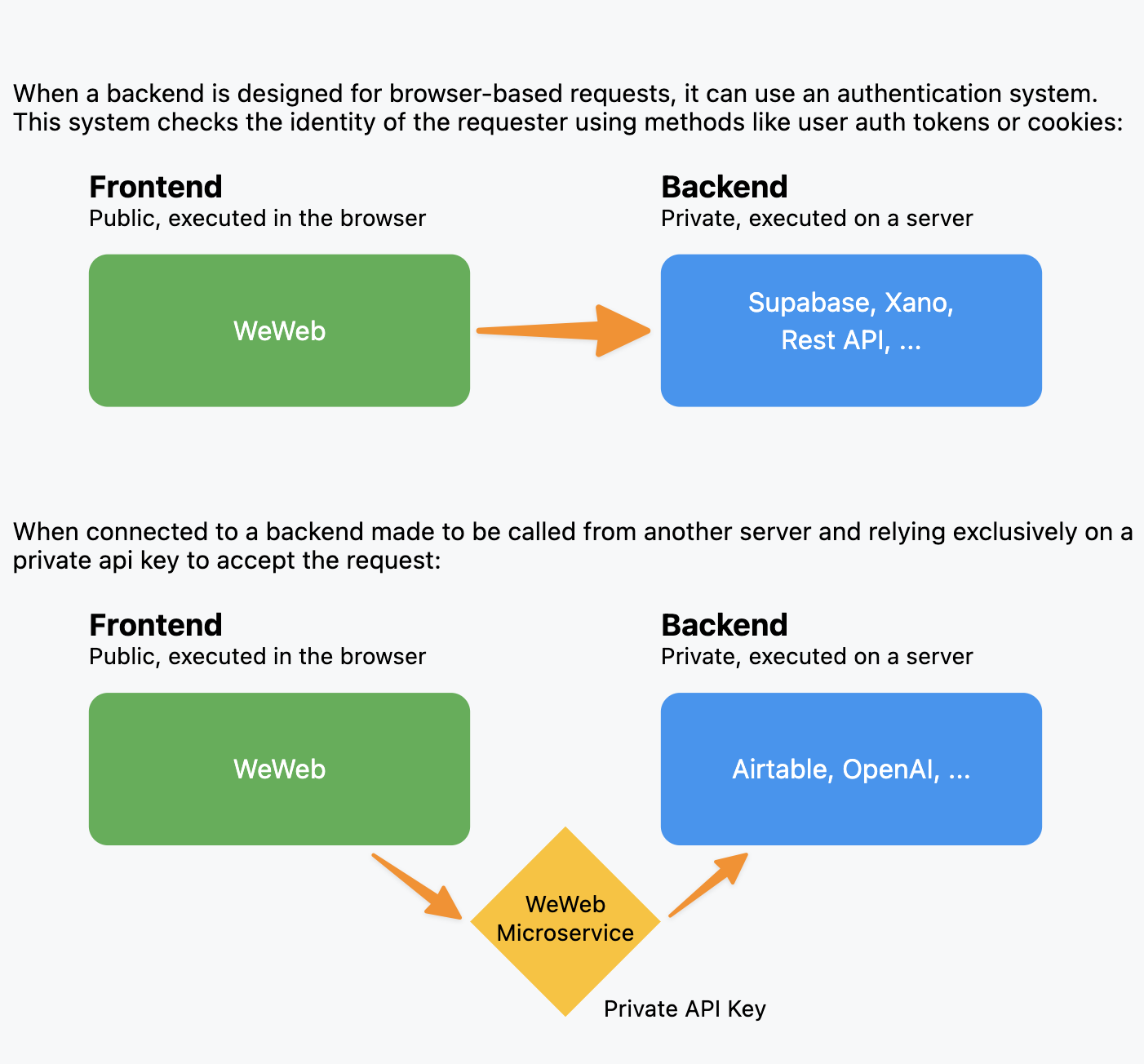
WeWeb uses microservices for certain plugins to handle security and API communication that can't be done safely from a browser. These are small, specialized servers that:
- Keep sensitive API keys secure
- Handle server-to-server communication
- Act as intermediaries between your app and external services
Which plugins work with self-hosting
Plugins that require WeWeb microservices:
- Airtable
- Google services (Sheets, Drive, etc.)
- Notion
- OpenAI
- SmartSuite
- SQL databases
- Stripe
- SOAP APIs
- WeWeb Auth
Plugins that work independently:
- Supabase
- Xano
- Standard REST APIs
- GraphQL APIs
- Direct database connections
Impact on self-hosting
When you self-host a project that uses plugins, the interface runs on your own infrastructure. However, you do not get access to WeWeb's managed microservices. That means:
✅ What continues to work:
- Direct API connections (REST, GraphQL)
- Databases designed for browser access (Supabase, Xano)
- Your own backend services
- Interface functionality that does not depend on WeWeb-managed microservices
❌ What stops working:
- Plugins that require WeWeb microservices
- Secure API integrations handled by WeWeb's servers
- Third-party services that need server-to-server communication
Before you export
Review all the plugins your project uses. If you rely heavily on microservice-dependent plugins, consider:
- Alternative solutions: switch to direct API connections where possible.
- Backend integration: move the functionality to your own backend.
Example: replacing the OpenAI plugin with a Supabase edge function
Here's a practical example of how you can keep a feature working when self-hosting by using a Supabase edge function instead of the WeWeb OpenAI plugin.
Instead of using the WeWeb OpenAI plugin:
- The OpenAI plugin requires WeWeb's microservices to securely handle API keys.
- When self-hosting, this plugin won't work because you don't have access to WeWeb's servers.
Use a Supabase edge function:
- Create an edge function in your Supabase project that calls the OpenAI API.
- Store your OpenAI API key securely in Supabase's environment variables.
- Call this edge function from your WeWeb app using the Supabase plugin (which works with self-hosting).
This approach gives you the same result while keeping everything compatible with self-hosting. The Supabase plugin works independently because it connects directly to your Supabase project without needing WeWeb's microservices.
TIP
You can apply this same pattern to other microservice-dependent plugins by moving their functionality to your own backend or using direct API integrations where possible.
Frequently asked questions
Why do some plugins stop working when I self-host?
Plugins that require microservices depend on WeWeb's servers for secure API communication. You won't have access to these servers in your self-hosted environment, so these plugins stop working.
For projects that use the WeWeb Auth plugin, where is user data stored and processed?
The WeWeb Auth plugin stores and processes data in the US (using AWS Cognito). This has an effect on EU data residency compliance as data leaves the EU.
CONTINUE LEARNING
Plugins have been replaced by integrations, which you set up in the Data & API tab. See what replaces each plugin and other legacy features.