
Appearance
Return
Protect a page for signed-in users
Restrict page access and configure redirects for unauthenticated users.
Steps at a glance
- In the
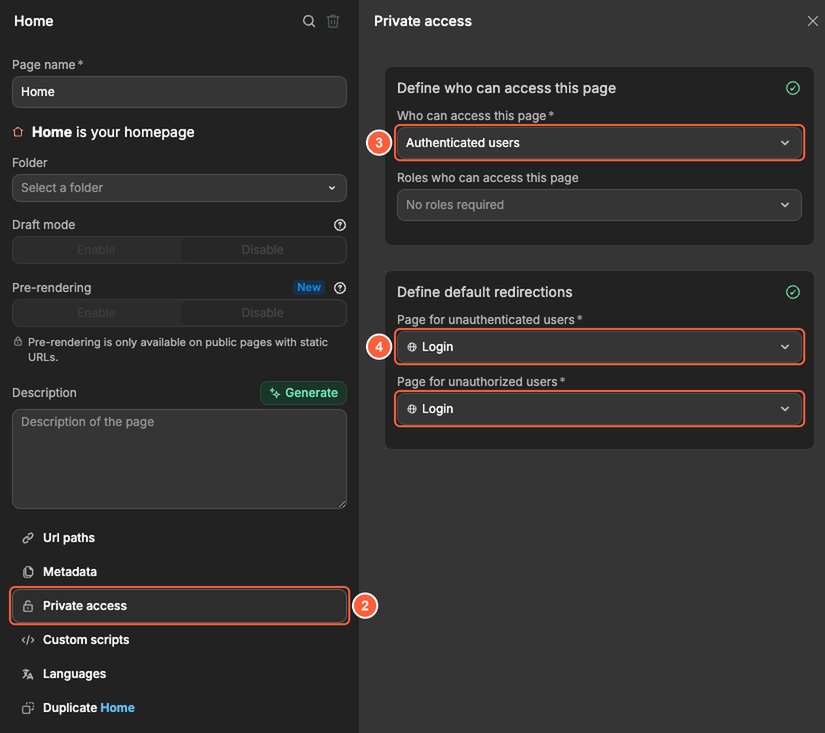
Interfacetab, open the page you want to protect and click the gear icon next to its name at the top of the page. - Open
Private access. - Set
Who can access this pagetoAuthenticated users. - In
Page for unauthenticated users, choose where visitors who aren't signed in should go (for example yourLoginpage). Also choose aPage for unauthorized users, where signed-in users go when they don't have the roles the page requires. - Test in preview mode by signing out and visiting the protected page.
Notes
- The
Page for unauthenticated userscan't be private itself. - Keep your sensitive logic in
Data & APIand secure API endpoints withSecuritysettings as well.