

Appearance
Return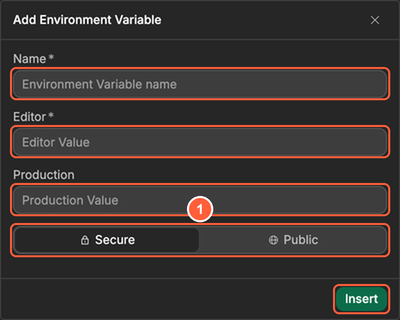
What are environment variables
Store keys and settings safely and reuse them across your project.
Steps at a glance
- Create an environment variable for a key or URL.
- Use it in your integrations and APIs.
- Keep different values per environment.
What an environment variable is
An environment variable is a named value (like RESEND_API_KEY) that you can use across your project without pasting the value everywhere.
When to use them
- API keys (keep them private)
- Base URLs
- IDs that change between environments
How to use them
- Open the
Settingstab, then openEnvironment Variables. In theCustomtab, clickInsert, enter aNameand its values, and chooseSecurefor keys and secrets (Publicvalues can be read in the browser). ClickInsert.
- Reference it wherever the value is needed (integrations, APIs, or other settings): click the binding icon of a field, then open the
Environment Variablestab of the binding window and select your variable.
Learn more about environment variables →
Common pitfalls
You pasted a key directly into the interface
- Keep keys in environment variables and use them from
Data & APIwhere possible. - Mark keys as
Secure.Publicvariables are sent to the browser, where anyone can read them.